12/17/2025

Troubleshooting Windows Blue Screen of Death (BSOD)

A Blue Screen of Death (BSOD) occurs when Windows encounters a "STOP Error"—a critical failure that forces the system to crash to protect data integrity.

The troubleshooting path depends on whether the system can boot to the desktop or is stuck in a restart loop.


Phase 1: Immediate Triage

  1. Capture the Stop Code: The most critical data point is the code at the bottom of the screen (e.g., CRITICAL_PROCESS_DIED, 0x0000000A).

  2. Disconnect Peripherals: Unplug non-essential hardware (USB drives, printers, webcams). Peripheral driver conflicts are a common cause of boot failures.

  3. Cold Boot: Perform a full shutdown and restart. If the error persists, proceed to diagnostics.


Phase 2: System & Driver Integrity (Desktop Accessible)

If the system boots, use these steps to resolve underlying software conflicts.

1. Analyze System Files (SFC & DISM)

Corrupted Windows system files are a frequent culprit.

  • Open Command Prompt as Administrator.

  • Run the following commands in order:

    DOS
    dism /online /cleanup-image /restorehealth
    sfc /scannow
    
  • Allow the process to complete. If sfc reports it repaired files, reboot and monitor.

2. Driver Management

Focus on GPU and Chipset drivers, which cause the majority of stability issues.

  • Update: Check Device Manager for yellow warning flags or download the latest stable release from the manufacturer’s site.

  • Rollback: If the BSOD began immediately after an update, use Device Manager to Roll Back Driver for the affected component.


Phase 3: Recovery Environment (Boot Loop)

If Windows cannot boot, enter the Recovery Environment (WinRE) or Safe Mode.

1. Force WinRE

  • Interrupt the boot process 3 times by holding the power button during the manufacturer logo. On the 4th boot, Windows will enter Automatic Repair.

2. Enter Safe Mode

  • Navigate to Troubleshoot > Advanced options > Startup Settings > Restart.

  • Press 5 or F5 for Safe Mode with Networking.

  • Once loaded, perform the driver uninstalls or system file checks mentioned in Phase 2.


Phase 4: Hardware Diagnostics

If software remediation fails, hardware failure is probable.

1. Memory Diagnostic

  • Press Win + R, type mdsched.exe, and select Restart now and check for problems.

  • Any error reported here typically requires physical RAM replacement.

2. Drive Integrity

  • Run an elevated Command Prompt.

  • Execute: chkdsk C: /f /r

  • Reboot to allow the disk check to run.


Common Stop Code Reference

Stop CodePotential CauseSuggested Action
CRITICAL_PROCESS_DIEDSystem file corruptionRun DISM and SFC tools.
MEMORY_MANAGEMENTDefective RAMRun Windows Memory Diagnostic.
IRQL_NOT_LESS_OR_EQUALDriver/Software conflictUpdate drivers or uninstall recent software.
DATA_BUS_ERRORHardware faultCheck RAM seating and motherboard connections.
INACCESSIBLE_BOOT_DEVICEStorage config/corruptionCheck BIOS storage mode (AHCI/RAID) or boot sector.


12/14/2025

Stop Putting Band-Aids on Bullet Wounds: The "5 Whys" Method for Root Cause Analysis

 In the high-speed environment of modern business, managers often fall into a common trap: The Firefighter Delusion.

We run from crisis to crisis, extinguishing fires. When a problem is solved, we feel a rush of dopamine. We feel productive. We feel like heroes. But if you find yourself fighting the same fire month after month, you are not a hero—you are stuck in a loop.

You are treating the symptom, not the disease.

To break this cycle, modern leaders must master a deceptively simple tool: The "5 Whys" Method.


From Toyota to Tech: The Origin

Originally developed by Sakichi Toyoda for the Toyota Industries Corporation, this method became the cornerstone of problem-solving training. While it started on the factory floor, it is arguably even more critical in the Knowledge Economy.

In software development, marketing, or operations, problems are rarely visible to the naked eye. They are hidden in bad code, poor communication workflows, or vague strategies.

How It Works (The Depth of Analysis)

The premise is simple: When a problem occurs, you ask "Why?" five times. By the time you reach the fifth answer, the nature of the problem—and its solution—usually transforms completely.

Let’s look at a practical, modern business example.

The Surface Problem: A key client is angry because a project delivery was missed.

  • 1. Why was the project late?

    • Because the development team didn't finish the code on time.

    • (The "Band-Aid" Solution: Yell at the developers to work faster.)

  • 2. Why didn't they finish on time?

    • Because they were waiting for the final designs from the creative team.

    • (The "Band-Aid" Solution: Tell designers to hurry up.)

  • 3. Why were the designs late?

    • Because the creative team was suddenly pulled onto a different "urgent" internal project mid-week.

  • 4. Why were they pulled onto another project?

    • Because the CEO had a last-minute idea and bypassed the project managers to request it directly.

  • 5. Why was the CEO able to bypass the workflow?

    • Root Cause: Because we lack a formal intake process for new requests that filters and prioritizes leadership demands against existing client work.

The Revelation: If you had stopped at the first "Why," you would have blamed the developers. They would have become demoralized and burned out. By going to the fifth "Why," you realized the problem isn't the people; the problem is the process. The solution is not "work harder," the solution is "implement a request protocol."

The Trap: The "Who" vs. The "Why"

This is where the modern manager must exercise high Emotional Intelligence (EQ).

In a low-trust environment, asking "Why?" feels like an interrogation.

  • "Why did you do this?"

  • "Why did you fail?"

This leads to defensiveness. People will lie or cover their tracks to protect themselves.

To use the "5 Whys" effectively, you must strictly follow the "Process, Not People" rule. Never let the answer to a "Why" be a person's name.

  • Bad: "Why did Steve make a mistake?"

  • Good: "Why did the system allow a mistake to be made without detection?"

When to Stop?

You know you have reached the root cause when the answer points to a process, policy, or mindset that can be changed. If the answer is something out of your control (e.g., "Because the economy is bad"), you have gone off track. Go back one step.

Conclusion: Be an Architect, Not a Firefighter

The "5 Whys" is not just a tool; it is a discipline. It forces you to slow down in a world that demands speed.

The next time a crisis hits your team, resist the urge to fix it immediately. Gather your team, take a deep breath, and ask the first "Why." You might find that the solution is cheaper, simpler, and more permanent than you ever imagined.

Top 5 AI Tools That Will Skyrocket Your Small Business Productivity in 2026

12/13/2025

The Triad of Modern Leadership: Tech, Strategy, and Psychology in the Age of AI

 The archetype of the successful manager has been rewritten. For decades, the dominant management philosophy was rooted in "Scientific Management"—a system designed for factories, optimizing for efficiency, repeatability, and strict hierarchy. In that world, the manager was a controller.

Today, we operate in a "Knowledge Economy" amplified by Artificial Intelligence. The variables have changed. Efficiency is no longer the only goal; innovation and adaptability are. The controller is obsolete; the orchestrator is required.

To lead a company successfully through the modern gauntlet of challenges, a manager must master a convergence of three distinct disciplines: Technological Fluency, Asynchronous Strategy, and Psychological Safety.

Here is an analytical breakdown of these three pillars.


1. Technological Fluency: Beyond Basic Literacy

In the past, technology was a department. IT handled the computers; managers handled the people. This siloed approach is now a liability. Technology has become the central nervous system of every modern organization.

The Shift from Intuition to Data-Driven Decisions The modern manager acts as a bridge between raw data and business strategy. It is no longer sufficient to rely on "gut feeling" or tenure-based experience. Analytical depth requires Data Literacy—the ability to read, understand, and communicate data as information. A manager doesn't need to code in Python, but they must understand the logic of data analytics. They need to know what questions to ask their data scientists. If a manager cannot distinguish between correlation and causation in a sales report, they are flying blind.

AI Augmentation: The "Centaur" Model The conversation around AI often centers on replacement. However, the analytical view is one of augmentation. The most successful modern managers are adopting the "Centaur" model (half-human, half-machine). They use Large Language Models (LLMs) to handle cognitive grunt work—drafting, summarizing, and pattern matching—freeing up their mental bandwidth for high-level strategy and creative problem-solving. The skill here is not just "prompt engineering," but workflow integration: knowing exactly which parts of a process can be automated without losing quality.

2. The Managerial Pillar: Asynchronous & Outcome-Based

The traditional 9-to-5 model was built on presence. If you were at your desk, you were working. The rise of remote and hybrid work has shattered this illusion, revealing that presence does not equal productivity.

The Death of Synchronous Dependency One of the greatest bottlenecks in modern companies is the reliance on synchronous communication (meetings). A deep analytical manager understands the cost of interruption. Every time a team is pulled into a "quick sync," their "Deep Work" state is broken. The solution is Asynchronous Mastery. This is the ability to manage through documentation, written briefs, and recorded updates. It requires a higher level of clarity in communication. When you cannot rely on body language or immediate feedback, your instructions must be flawless. This shift turns "writing" into a primary management skill.

Managing Outcomes, Not Inputs Transitioning to outcome-based management requires a fundamental psychological shift. It means abandoning the comfort of micromanagement. Instead of monitoring how or when the work is done (the inputs), the modern manager focuses strictly on the results (the outcomes). This requires setting clear, measurable KPIs (Key Performance Indicators) and trusting the team to navigate the path to those goals.

3. The Psychological Pillar: EQ as a Strategic Asset

Perhaps the most counter-intuitive development in the tech-heavy era is that soft skills have become hard currency. As AI takes over logical and analytical tasks, the uniquely human traits—empathy, negotiation, and morale building—become the manager's primary value proposition.

The ROI of Psychological Safety Google’s internal study, "Project Aristotle," revealed that the single most important predictor of a high-performing team is Psychological Safety. This is not about being "nice"; it is about creating a culture where employees feel safe to take risks and admit mistakes without fear of punishment. Analytically speaking, fear inhibits the prefrontal cortex, killing creativity. A manager who rules by fear is literally making their team less intelligent. The modern leader must actively cultivate an environment of "Radical Candor," where challenge is encouraged, and failure is viewed as data for improvement, not a reason for termination.

Cognitive Empathy and Burnout Defense We are facing a global burnout crisis. The modern manager must act as a firewall between organizational pressure and team well-being. This requires Cognitive Empathy—the ability to understand someone else's perspective intellectually, not just emotionally. It involves recognizing the subtle signals of burnout (cynicism, detachment, reduced efficiency) before they become critical. It means understanding that sustainable pace yields better long-term results than "crunch culture."

Conclusion: The Renaissance Manager

The modern manager is no longer a specialist in one narrow field. They are a generalist—a "Renaissance figure" capable of discussing API integrations in the morning, optimizing operational workflows at lunch, and coaching a struggling employee through a crisis in the afternoon.

The path forward is not about choosing between technology and psychology. It is about integrating them. The technology provides the leverage; the psychology provides the motivation; and the management strategy provides the direction. Mastering this triad is the only way to navigate the complexities of the future.


Top 5 AI Tools That Will Skyrocket Your Small Business Productivity in 2026

12/09/2025

Liquid vs. Logic Board: The Ultimate Guide to Saving a Wet Laptop (Beyond the Rice Myth)


Introduction: It happens in slow motion. The knock, the spill, the splash. Whether it’s water, sugary coffee, or a craft beer, liquid is the mortal enemy of electronics. But here is the harsh reality: the liquid itself isn’t usually what kills your laptop. It’s the electricity interacting with that liquid.

In this guide, we are moving beyond the panic. We will explore the science of galvanic corrosion, explain why the "bag of rice" trick is actually dangerous for your hardware, and outline the only scientifically proven method to resurrect a water-damaged machine.


Phase 1: The "Golden Minute" (Critical Response)

While the subsequent cleanup requires patience, your first 60 seconds determine if the laptop survives at all. The goal is simple: Stop the electrolysis.

Electrolysis occurs when an electrical current flows through a liquid, causing metals to migrate and corrode instantly. To stop it, you must kill the power source.

  1. The Hard Kill: Do not use the mouse to shut down Windows. Hold the physical power button for 5-10 seconds until the machine dies.

  2. Sever the Power: Unplug the AC adapter immediately.

  3. Battery Removal (If possible): If your laptop has an external battery, pull it. If it’s an ultrabook with an internal battery, proceed immediately to the draining phase.

Pro Tip: Never flip the laptop right-side up to "check if it works." This allows gravity to pull the liquid further down into the motherboard layers.


Phase 2: Understanding the Enemy (Fluid Dynamics)

Not all spills are created equal. Understanding what you spilled dictates your recovery strategy.

  • Water: The "best" case scenario. It is conductive but typically leaves minimal residue once fully evaporated.

  • Sugary Drinks (Soda/Coffee): These are the silent killers. As the water evaporates, it leaves behind a conductive, sticky syrup. This residue attracts dust and holds moisture, meaning corrosion can continue weeks after the accident.

  • Alcohol/Beer: Highly acidic. Acid eats through the protective coatings on the motherboard traces and solder points much faster than water.


Phase 3: The Great Rice Deception

You have heard it a thousand times: "Put it in rice!" Do not do this.

As a tech resource, we need to debunk this myth permanently. Here is why rice is a bad idea:

  1. It's too slow: Rice is a passive desiccant. By the time it absorbs ambient moisture, corrosion has already set in.

  2. The Starch Problem: Rice dust and starch can enter the laptop’s cooling vents and USB ports. When mixed with the spilled liquid, this creates a paste that essentially cements the damage inside your machine.

The Solution? Airflow. Position the laptop in an inverted V-shape (tent mode) in a dry, warm room with active airflow (a fan blowing across it, not directly into the vents).


Phase 4: The Advanced DIY Fix (For the Tech-Savvy)

Disclaimer: This section requires opening your device. Proceed at your own risk.

If you spilled anything other than pure water, simply drying it out isn't enough. You need to remove the chemical residue.

  1. Open the Chassis: Remove the back panel to expose the motherboard.

  2. Disconnect the Battery: This is the priority connector.

  3. Inspection: Look for white or green crusty deposits on the chips (this is oxidation).

  4. The Magic Solvent: Use 99% Isopropyl Alcohol (IPA). Do not use rubbing alcohol (which is often only 70% alcohol and 30% water).

  5. The Clean: Use a soft toothbrush dipped in 99% IPA to gently scrub the affected areas. The alcohol will dissolve the sticky residue and displace the water, then evaporate almost instantly.


Summary: When to Call a Pro

If the spill involved a significant amount of sugary liquid, or if the laptop was running for minutes while wet, the liquid may have bridged critical power rails (like the CPU power line). In this case, professional ultrasonic cleaning is the only reliable fix.

Bottom line: Patience saves hardware. Never power on a wet laptop sooner than 48 hours after the incident.

------------------------------------------------------------------------------------------------------------------------


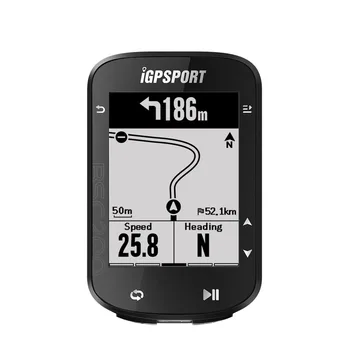
IGPSPORT BSC200 GPS Bicycle Computer Cycling Odometer Wireless Speedometer Route Navigation ANT + Bluetooth5.0 Accessories


How AI Is Changing IT Support and Computer Repair in 2025

  How AI Is Changing IT Support and Computer Repair in 2025 Artificial Intelligence is no longer a futuristic concept reserved for research ...